
Welcome to the latest in our Masterclass series! We’ve talked about COBie, Uniclass, Exporting and Clash Detection and now we’re going to chat about Parameters.
If clash detection is about coordination, and COBie is about information exchange, then parameters are the foundation that make BIM intelligent in the first place.
First things first, what exactly are parameters?
Parameters are one of the most fundamental concepts in BIM. At their core, parameters are data fields attached to model elements. They store and communicate information about everything in your model, from walls and doors to ducts and equipment.
Think of parameters as the DNA of your BIM model:
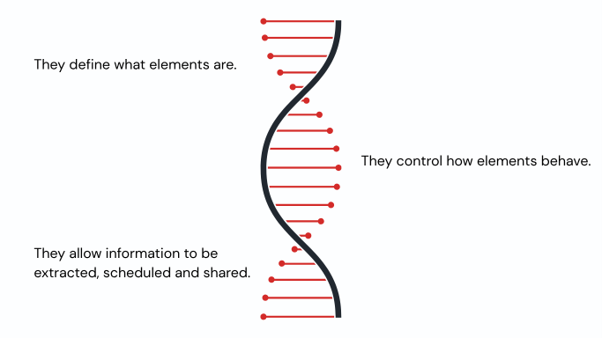
Without parameters, your model is just geometry. With parameters, it becomes information-rich and usable across all project lifecycles.
Why do parameters matter?
Parameters are where design, data, and delivery all meet. They might look like simple fields in the background, but they’re doing a lot of heavy lifting. Here’s why they matter:
1. Intelligent Modelling
Parameters help models behave intelligently. They can control geometry, materials and relationships, so when one value changes, the model can respond automatically. For example, updating a height parameter could adjust multiple related elements without you having to edit each one manually.
2. Consistency and Standardisation
When everyone uses the same structured fields, the model becomes much easier to manage. Parameters help teams stay consistent, especially when working to standards such as Uniclass or COBie.
3. Data Extraction
If you’ve ever pulled together a schedule, tag or quantity take-off, you’ve already relied on parameters. They’re what make the model reportable, measurable and genuinely useful.
4. Better Decision-Making
Good parameter data gives project teams something solid to base decisions on. Whether it’s cost, performance, maintenance information or asset data, reliable parameters help people make better choices with more confidence.
What are the key types of parameters?
To use parameters well, it helps to understand the main types you’re likely to come across. In a Revit and BIM context, these are the big ones:
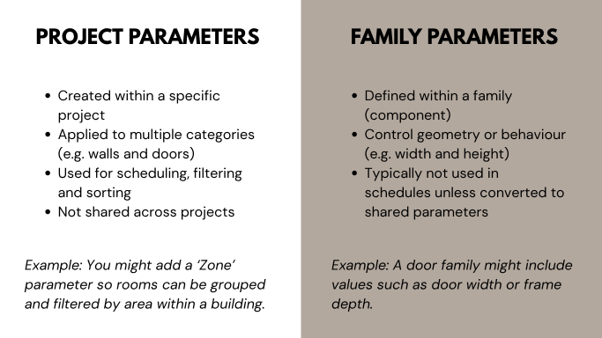
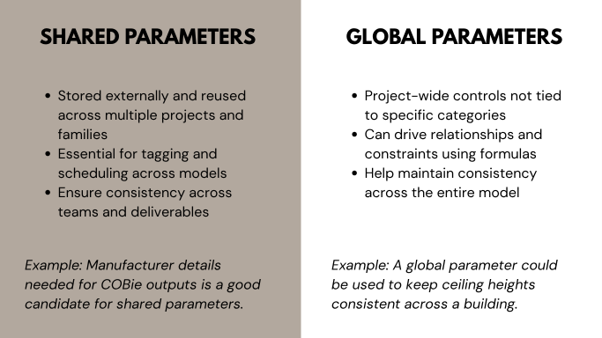
An area that catches people out often is the difference between Type parameters and Instance parameters.
Type parameters apply to all elements of that type so changing one updates all instances. Whereas instance parameters apply to individual elements only so changing one does not affect others. Think of it this way; an instance parameter is one specific door and a type parameter is all doors of that type.

It sounds simple, but mixing these up can cause unexpected model changes — and sometimes a lot of rework.
Parameters in practice
So, what does all of this look like on a live project? Here are a few familiar workflows where parameters really earn their keep:
In Clash Detection: Parameters can be used to define system classifications, clearances or zones, which makes clash filtering and reporting much more focused.
In Uniclass: Parameters often hold classification codes, helping elements stay consistently tagged and easy to search across the model.
In COBie: COBie relies entirely on structured data, so well-planned shared parameters are essential if you want asset information to export cleanly.
How to make parameters work for you rather than against you
It really comes down to being organised, a bit of planning goes a long way:
Parameters are easy to overlook at the start of a project, but they play a huge role in BIM maturity. A well-structured parameter strategy is what turns your model from a 3D representation into a connected, data driven digital asset.
In the next BIM Masterclass, we’ll build on this by looking at how data structures and information management workflows bring everything together across the project lifecycle.
What’s next?
If you’ve got an upcoming project and want to chat through your requirements, get in touch with us today.